
The simple FTP client for FTP, FTPS and SFTP servers.
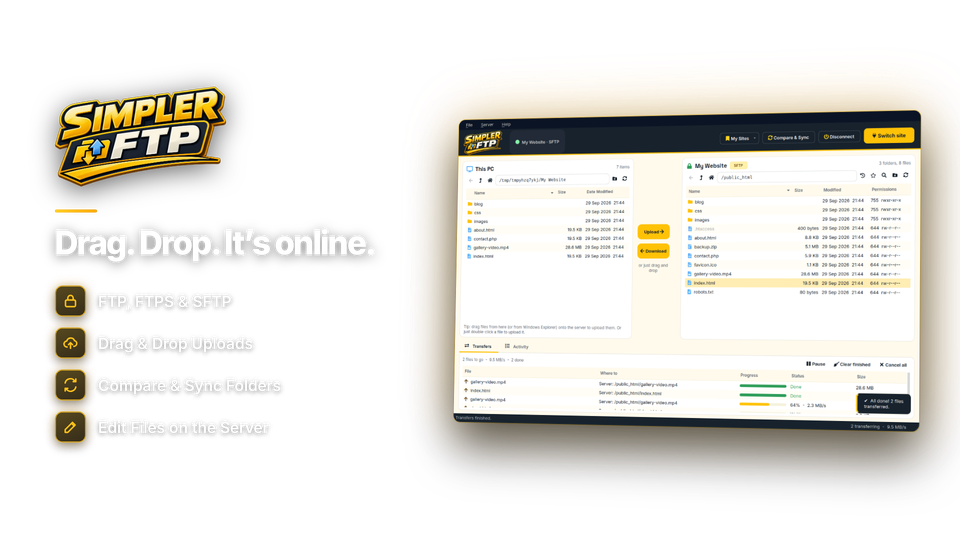
Simpler FTP is the easiest way to move files between your Windows PC and your website or server. Your PC on the left, your server on the right: drag files either way, save every site with an encrypted password, let the queue resume if the connection drops, and upload only what changed with Compare & Sync.
The tools you actually use. None of the clutter.
Everything you need to get files onto a website or server and keep them up to date - without the maze of panels and settings.
Transfers
Two-pane drag and drop
Your PC on the left, your server on the right. Drag files and whole folders either way, or drop them straight in from Windows File Explorer. Open another window to work on two sites at once.
Transfer queue with auto-resume
Every file shows its own progress and speed. If the connection drops, Simpler FTP reconnects, carries on with the queue and resumes large files from where they stopped.
Folder Compare & Sync
See exactly which files are new, changed or missing on each side, and upload only the difference - ideal for deploying a site without re-uploading everything.
Security
SFTP and FTPS encryption
Secure by default: SFTP over SSH and FTPS with explicit or implicit TLS, plus plain FTP - active or passive, including anonymous - for older servers and local devices. Automatic picks the most secure option your server offers.
Passwords and SSH key files
Log in with a password, an SSH key file, or both. Saved passwords are encrypted on your PC and never sent to us - there's no account and no cloud sync.
Permissions without the guesswork
Set file and folder permissions with simple tick boxes for owner, group and public - read, write and execute - instead of remembering numbers.
Workflow
Site Manager
Save every server with its host, port, protocol, user name and default folder, grouped into folders, and connect with a double-click - in this window or a new one.
Edit in place
Open a server file in your own editor. Save it, and Simpler FTP uploads it back automatically.
File operations and navigation
Rename, move, delete and create folders on the server, search it, bookmark folders and jump back to recent ones, and copy server paths - with the Windows keyboard shortcuts you already know.
Connects to the server you already have.
Use the details your host gave you - Simpler FTP picks the most secure option the server offers.
| Protocol | Default port | Encryption | Sign in with | Use it for |
|---|---|---|---|---|
| SFTP | 22 | SSH | password, key file | VPS, dedicated servers, most modern hosting, NAS drives |
| FTPS | 21 / 990 | TLS explicit / implicit | password | Shared hosting (cPanel, Plesk) and Windows IIS servers |
| FTP | 21 | none | password, anonymous | Older servers, local devices and trusted networks (active and passive) |
From install to first upload in under a minute.
Your host's login details are all you need.
Add a site
Host, user and password.
protocol auto
Connect
Double-click the site.
folder /public_html
Drag or sync
Drag files, or Compare & Sync.
queue running
Done
Your site is live.
errors 0

One client, from a single site to a client roster.
Deploy without re-uploading everything
Compare & Sync uploads only the files that changed, with every client's server saved in the Site Manager.
Your host gave you an FTP login. Now what?
Add the details, connect and drag your files across. Simpler FTP picks the secure option for you.
NAS, Pi and media servers
Move files to and from your NAS, Raspberry Pi or media server over SFTP, with SSH key logins.
One license. Every feature. Yours to keep.
SFTP, FTPS and FTP, the Site Manager, Compare & Sync and edit in place are all included. No subscription. Free updates.
- ProtocolsSFTP, FTPS, FTP
- Saved sitesunlimited
- Works onWindows 10 & 11 (64-bit)
- Updatesfree
- Activations1 PC
- Deliverydownload + key by email
Checkout
You'll go straight to your download page once payment is confirmed, and we'll email your download link and license key.
Already bought? Get your download link again.
FTP client questions, answered.
What do I need to connect to my website?
The host name, user name and password (or SSH key file) from your web host. In cPanel they are under FTP Accounts.
FTP, FTPS or SFTP - which should I use?
SFTP if your server offers it, otherwise FTPS. Both encrypt everything you send. Plain FTP is only for older servers and trusted local networks. Choose Automatic and Simpler FTP picks the most secure option your server offers.
Where are my saved passwords stored?
Encrypted on your own PC, never in plain text and never sent to us. There is no account and no cloud sync.
What happens if the connection drops mid-transfer?
Simpler FTP reconnects and carries on with the queue, and large files resume from where they stopped.
Can I deploy only the files that changed?
Yes. Compare & Sync shows which files are new, changed or missing, and uploads only the difference.
Does it support SSH key authentication?
Yes. SFTP can use a key file on its own or together with a password.
Can I edit a file on the server?
Yes. Open it in your own editor, save it, and Simpler FTP uploads it back automatically.
Can I work on two sites at once?
Yes. Open another window from the File menu or connect a saved site in a new window.
Which versions of Windows are supported?
Simpler FTP runs on 64-bit Windows 10 (version 1809 or later) and Windows 11. You can look around and change settings before activating; connecting to servers unlocks with your installation key.
Is it a subscription?
No. It is a one-time payment of $29.95 with free updates.
How do I get the software after paying?
You go straight to your download page once payment is confirmed, and your download link and installation key are emailed to you. In Simpler FTP, choose Settings > Enter Installation Key and click Activate.
File transfer, simplified.
SFTP, FTPS and FTP with drag and drop, saved sites and sync. One license, no subscription.
Get Simpler FTP · $29.95